
Introducing Stanza
Jeremy Fischer ·
With Stanza, you go from an idea to content you're proud of, faster.
Stanza plugs into the AI agent you already use and onboards it to your company. No more wrangling a stranger every time you open a chat.
AI can already write words fast. Getting to something usable is the hard part. Most writing chats with AI go something like this:
- "That's not quite what I mean."
- "Our customers wouldn't care about that."
- "We don't actually do that."
- "This sounds nothing like us."
And God forbid you ask it to "help me come up with an idea for a post about..." If it wasn't clear enough already that the AI doesn't know you, just wait.
You get there eventually, one correction at a time. Then you open a new chat for the next piece and start wrangling the AI all over again.
That's because the AI flies blind in every chat. It's like asking a smart person you just met on the street to write for your company. They're sharp, and they can think with you. But they don't know your product or your customers. They've never read your blog, your LinkedIn posts, or last month's newsletter, so they can't help spin a new piece off an old idea or notice you're about to say the same thing twice. So you spend half the conversation onboarding them. A teammate who's been at your company for a few months wouldn't need any of that. Your agent shows up as a stranger every single time.
You're the writer. Stanza makes you faster.
Stanza onboards your agent for you. It gives your agent what a teammate would already know: your product, your audience, your voice, and what you've already said. So every chat starts from a better place.
You bring the intent, the taste, and the judgment. With Stanza, your agent becomes a sidekick that actually knows your company. It researches the web, digs through your past content and old ideas, pulls in data, talks through angles with you, and pressure-tests your copy. Then you decide what's worth saying and what makes the cut.
Sounding on-brand is only a sliver of what makes a piece worth publishing. Once your agent knows your company, it can also:
- Pitch ideas that fit your company, instead of the same five angles every AI suggests.
- Review your copy the way an engineer reviews a teammate's code before it ships. It catches the wrong claim, the feature you don't have, the confusing story, and the line that sounds nothing like you.
- Work through team feedback. Your teammates comment on the draft, and your agent pulls those comments in so you can work through them together.
What is Stanza?
Stanza isn't another app you have to move into. You already work in ChatGPT or Claude. That's where your ideas, your research, and your half-finished drafts live. Stanza plugs into that agent and gives it two things it can't do on its own:
- It gets onboarded to your company. Stanza holds your brand, your audience, your voice, and what you've already said. Your agent reads it before you start.
- It has somewhere to put the draft. One draft that you, your agent, and your team all see, with every comment on it, live. Your agent reads the comments right where your team left them and works through them with you.
Without a shared draft, whatever you and your agent make is walled off in your chat. So you copy the draft into a Google Doc or Notion. Share it. Wait for comments. Paste the draft back into the chat, then every comment after it, so your agent knows what your team said. Make one change and the other copy is already out of date.
You don't open Stanza to start writing. You open your agent, like you already do. It shows up already knowing your company. And when you're ready for feedback, the draft moves between you, your agent, and your team without anyone copying and pasting.
The same launch post, without and with Stanza
Let's say a feature your customers have asked for all year finally shipped. You want the launch post out today, so you open your agent and ask it to help you find the angle.
| Step | ❌ Without Stanza | ✅ With Stanza |
|---|---|---|
| Find an angle | The agent pitches "Introducing our new feature: a game-changer for your workflow." It doesn't know who asked for this, why they wanted it, or that you teased it in last quarter's newsletter. You explain all of it. | Your agent checks your brand guide and past posts, sees you teased this feature last quarter, and pitches angles that pay that off. You pick one. |
| Work on the draft | It gets the feature's name wrong and promises an integration you don't have. You go back and forth: "We don't actually do that." "This sounds nothing like us." | You and your agent work on the post with the right feature name, the right audience, and your voice. You shape the argument and edit the draft. |
| Get feedback | You copy the draft into a Google Doc or Notion so the engineer who built the feature can check the details. | You share the draft in Stanza. The engineer who built the feature leaves comments right on the lines that need fixing. |
| Revise | You paste the draft and every comment back into the chat, then work through them. | Your agent reads the comments and works through them with you. You decide which changes to make. |
| Next launch | You explain your company all over again. | Your agent already knows all of this. |
You still do the thinking and make the calls. You just stop onboarding a stranger every time you sit down to write.
How does Stanza work?
Your agent knows your company
Stanza keeps your brand guide, the references behind it, and your past content in one place. You connect the agent you already use, so it can draw on that context while you work together.
Say you're looking for an angle for that launch post. Your agent can look at what your company does and what you've already said as you explore ideas together. Or you can ask it to review a draft with your audience in mind.
Stanza works with ChatGPT, Claude, Grok Bot, and other AI tools through MCP (Model Context Protocol), a standard way for an AI agent to use another app. Each person signs in with their own Stanza account and only sees the projects they belong to.
You can read more about what goes into Stanza Context and how to connect your agent.
Your agent can share the draft with your team
When you're ready to write, ask your agent to create the draft in Stanza. You can work on it with your agent, make edits, and share it with teammates for feedback.
A teammate can open the draft and leave a comment on a passage. Your agent reads that comment and works through it with you. In ChatGPT, you can open the draft right beside the conversation. It's the same full-featured editor as the Stanza web app. You see who else is in the draft, leave comments, and edit alongside your team, all without leaving ChatGPT. Everyone in your project already has access, so there's nothing to send around.
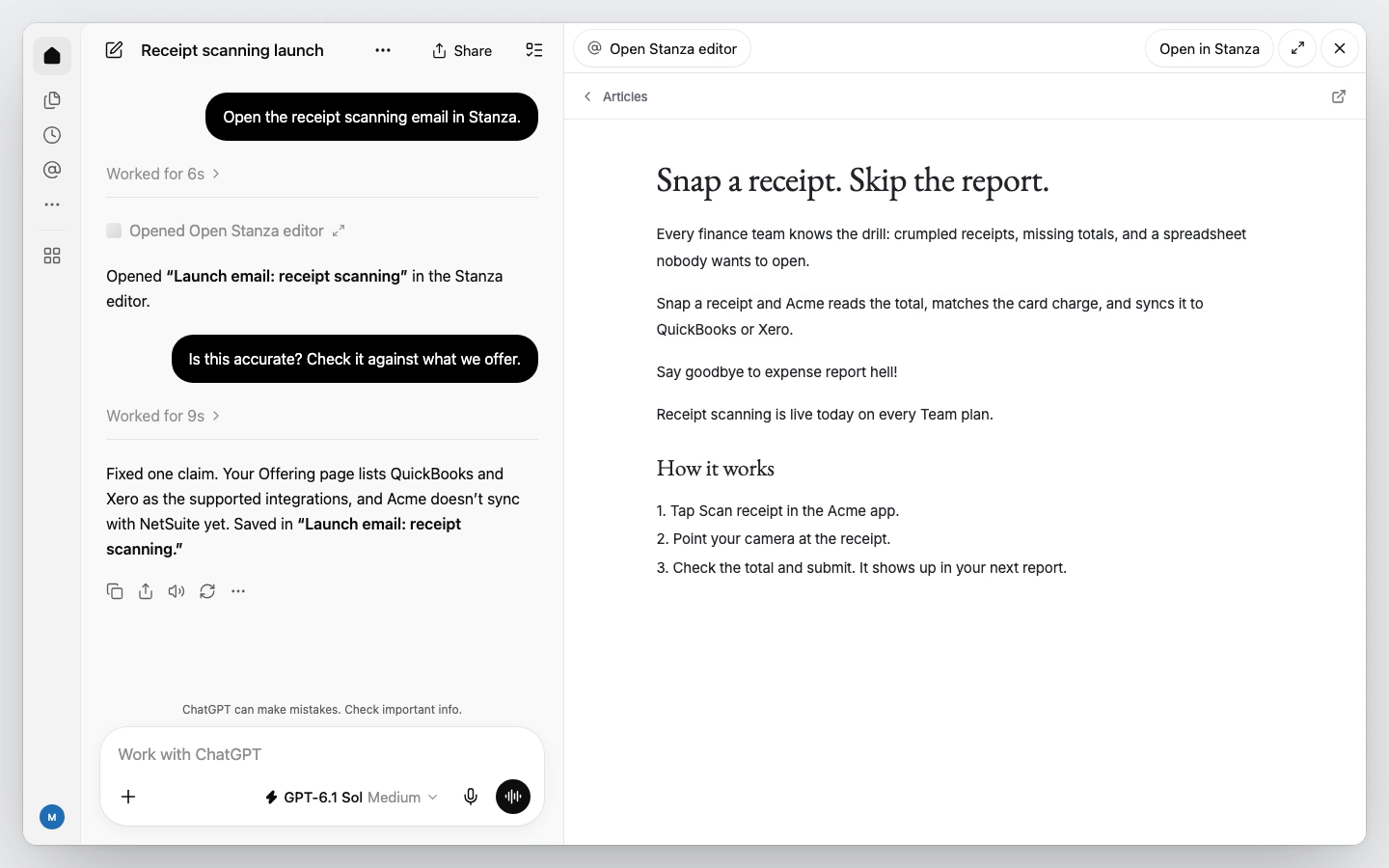
The editor guide has more detail on drafts and comments.
Does Stanza write the content?
Nope, you do, with your agent at your side. Stanza gives your agent the context it was missing, and gives you, your agent, and your team one place to work on the draft. What's worth saying, and what makes the cut, is still your call.
Who is Stanza for?
Stanza is for people who write for a company and use AI agents to help them move faster:
- Founders who write their own content and are tired of re-explaining the company to AI.
- Solo marketers who need to ship a lot without writing a novel-length prompt every time.
- Content teams who want every writer, and every agent, working from the same brand guide and the same drafts.
Stanza isn't a fit if you don't use an AI agent. It makes the agent you already work in better informed. It doesn't give you one. And if you only write a post or two a quarter, a doc of notes pasted into the chat will get you by. Stanza is for when you're writing every week and tired of onboarding a stranger every time.
Get started
Sign up at runstanza.com. Then follow Write your first draft to add your brand material, and connect Claude or ChatGPT so your agent can use it.